
AI Script Fixer
MANUAL
1. Overview
AI Script Fixer is an Editor-only Unity tool that automatically collects recent compile and runtime errors from the Console, sends the context along with your source files to a selected AI provider, and applies the returned code fixes directly to your project. Whether you’re debugging a tricky compiler error or chasing a runtime exception, this tool lets AI handle the fix while you focus on building your game.
Key Benefits:
- 7 AI Providers: Supports OpenRouter, ChatGPT / Codex, Ollama, LM Studio, Gemini, Claude, and DeepSeek — use any model you prefer.
- One-Click Fixes: Automatically reads errors, fetches the relevant source files, sends everything to an AI, and applies a patch — all in one action.
- Built-in AI Console: A dedicated chat-style window inside Unity where you can see AI responses, diff summaries, and fix history.
- Local & Cloud: Works with cloud APIs (OpenRouter, ChatGPT, Gemini, Claude, DeepSeek) as well as fully local models (Ollama, LM Studio) — your code stays private if you choose.
2. Supported Platforms

3. How to Use
DISCLAIMER: To use this asset, you need to register an account with an API provider. Simply search Google for the provider name followed by “API Key” (for example, “OpenRouter API Key”) and you will immediately find what you need.
Get started by configuring your preferred AI provider and then let the tool fix your scripts automatically.
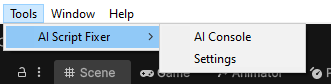
- Step 1: Open Tools > AI Script Fixer > AI Console and place (drag and drop) it alongside the standard Console.
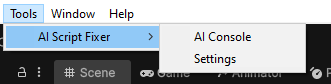
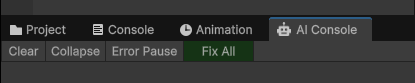
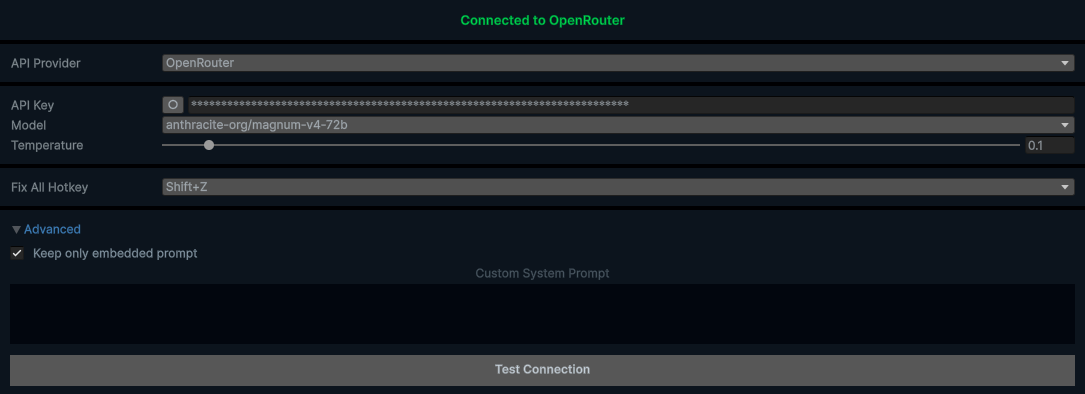
- Step 2: Open Tools > AI Script Fixer > Settings and select your AI provider.
- Step 3: Enter your API key (if required) and choose a model.
- Step 4: Click “Test Connection” to verify everything works.
- Step 5: Next time you have compilation errors, do the following: Open > AI Console and press the “Fix All” button — the tool will collect errors, send them to AI, and apply fixes automatically.
Supported AI Providers:
- OpenRouter — access hundreds of models through a single API.
- ChatGPT / Codex — OpenAI models with optional ChatGPT subscription sign-in.
- Ollama — run models locally, no internet required.
- LM Studio — another local option with a user-friendly interface.
- Gemini — Google’s generative AI models.
- Claude — Anthropic’s advanced reasoning models.
- DeepSeek — cost-effective AI models with strong coding capabilities.
Customization:
You can configure your provider, API keys, model selection, temperature, max tokens, reasoning effort, and custom system prompts at any time via:Tools > AI Script Fixer > Settings
API Keys & Security:
Your API keys are stored securely in the project’s local directory and are never included in player builds. Cloud providers require outbound HTTPS access, while Ollama and LM Studio work entirely offline on your local machine.
FAQ
Q: Is my code sent to external servers?
A: Only if you use a cloud provider. With Ollama or LM Studio, everything stays on your machine.
Q: Do AI-generated fixes always work?
A: AI-generated code changes should always be reviewed before acceptance. The tool shows a diff summary so you can see exactly what was changed.
Q: Which Unity versions are supported?
A: Unity 2021.3 and newer.
Need help? Email us
support@redasgames.com